Points and a loyalty programme
Points for every member: earned on payment automatically, adjusted by you, spent by the visitor.
Where: The Data panel → the members table → “Points column”.
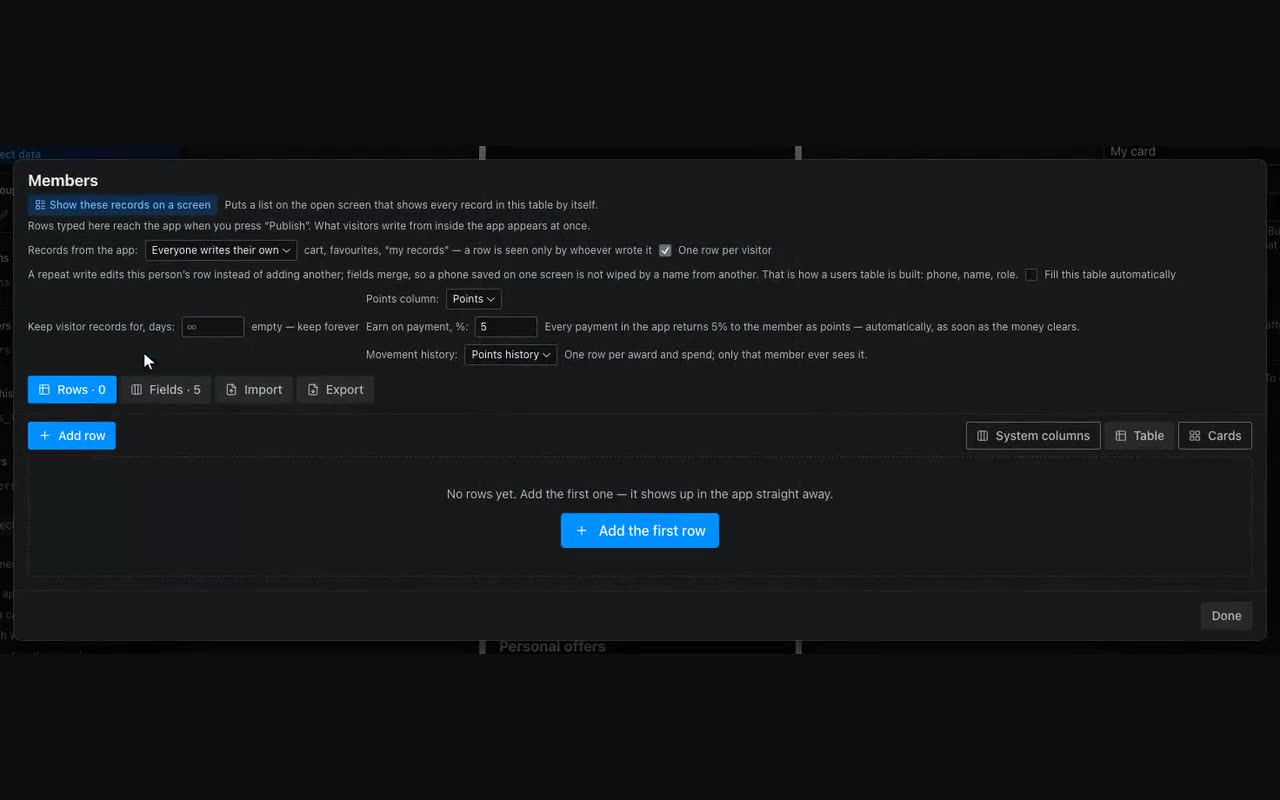
Points live in the member’s own row, not in the app memory: that lives on one phone only and is wiped when the app closes, while a row belongs to a person and stays. So the programme starts with a members table — the one marked “Everyone writes their own” and “One row per visitor”.
- Points column. Name the numeric column that holds the balance. Until it is named, there is no programme.
- Earn on payment, %. Every payment inside the app returns that percentage to the member as points — the server works it out the moment the money clears. Zero means nothing is earned on payment, which is a fine choice: awarding by hand and spending still work.
- Movement history. A table that gets one row per award and spend: date, amount, reason. Only that member sees it. Not keeping one is also fine: the balance is unaffected, and every history row uses up your plan’s records.
The balance is shown with the {{me.points}} substitution — where points is your column key and me is the row of whoever opened the app. Tier, name and phone come from the same place: {{me.tier}}, {{me.name}}.
To award or deduct by hand, open the members table and press + in the points cell: the amount, what for, then Award or Deduct. The cell is deliberately not typed into — typing means “make it this number” and would wipe out an automatic award that landed in the same second.
Spending is done by the visitor, with the Spend points action on a button: how many (a substitution such as {{item.price}} works) and what for. There is no way to award points from a button, and that is not an editor limitation: the number travels from a browser, and a button that could add would mean points are printed by whoever spends them.