Substitutions {{…}}
How to put data into text: a row field, something the app remembered, the user’s name, the time.
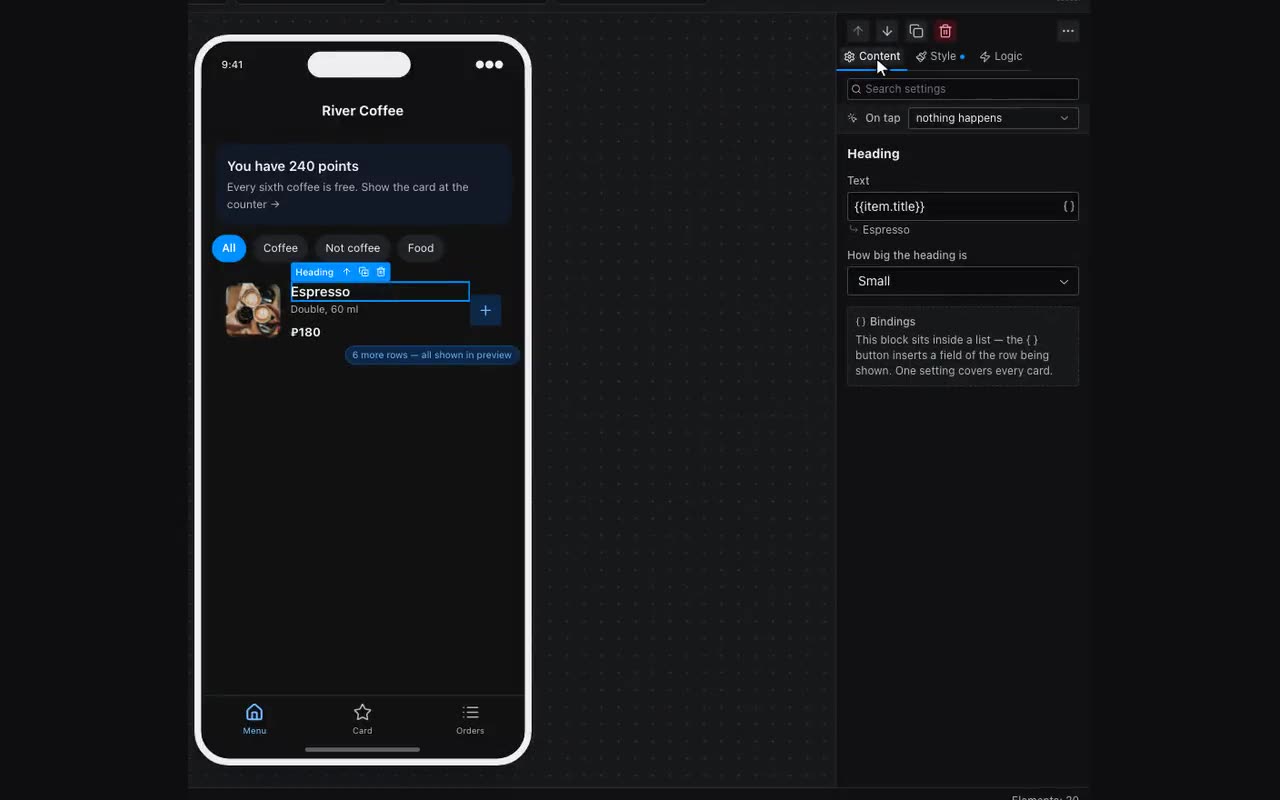
A substitution is {{path}} inside any text property. You need not type it: next to the field there is a { } button listing what is available, with search, and below the field you see what it currently resolves to.
Здравствуйте, {{user.firstName}}! В корзине: {{cart.count}}| Group | What is available |
|---|---|
| Current list row | {{item.field}} inside a repeater — different in every card. {{item}} is the whole row. |
| App memory | {{category}}, {{cart}}, {{selected.title}} — anything defined in Data. |
| User | {{user.name}}, {{user.firstName}}, {{user.lastName}}, {{user.username}}, {{user.handle}}, {{user.photo}}, {{user.language}}, {{user.phone}}, {{user.id}}. |
| App | {{app.bot}}, {{app.maxBot}} — links to your bots. That is what a “Message us” button opens; both stay empty until the app is published. |
| Screen | {{screen.name}}, {{screen.slug}}, {{screen.id}}. |
| Time | {{now}}, {{today}} and offsets written inline: {{now+2h}}, {{now-30m}}. |
Substitutions are not limited to text: a payment amount, a QR code’s value, a count badge, a filter value — anywhere a string is expected.
Dates and times: what to show and how. Pick a date column in the { } list and a second step opens: “What to show” — the date, the time or both — and “How to show it”, as a list of samples: “12 August”, “12.08.2026”, “19:00”. The choice goes into the substitution itself — {{item.date | HH:mm}} — so a card can read “12 August, 19:00” while the line below shows “19:00” from the very same column. No need for a separate column per format: sorting, filters and visibility conditions keep reading the raw stored value whatever you pick for printing.
Countdown and date formats. The Countdown block takes the same column in its “Until” field: {{selectedEvent.dateTime}}. The display format you picked for that column (“25 Sep, Fri”) does not get in its way — it counts from the stored value, while only text prints the format. It stays silent in one case: when the column holds hand-typed text like “25 September” rather than a date — no moment can be read out of that, and we will not guess for you. The size, colour and font of the digits come from the Style tab, and the unit labels are picked in Content: “37 дн”, “37 дней”, “37 d” or none at all — “37 : 23”.
What is known about the record itself. Besides its columns every row has four service fields that the table does not show: Record id, Added, Changed and Views. They are offered in the same { } list — {{item.__createdAt}} — print with the same date masks as a date column, and work in filters and sorting: “new this week” needs no hand-filled column at all. They fill themselves: on a row added from the app the server stamps them, on a row typed in the editor the moment you created or edited it. Rows that were already in the table before 15 August 2026 have both empty — inventing a date for them after the fact would be a lie.
How many records a table holds: {{users.total}}. “128 of us already”, “24 events in the listing” — take it from the { } list, the second line under the table name (“Records in total”). The server counts it, and counts everything: in a table with one row per visitor everyone sees only their own row, so the neighbouring {{users.count}} equals one for everybody — it honestly counts what arrived for that person. No row contents are exposed: a single number comes back. In the editor and on the canvas it shows as many records as your table holds. The number is taken when the app opens and follows what the visitor does themselves: add a record and the counter grows on the spot, no reload needed.
A list in one line: {{seats.join.code}}. A list in the app memory holds several rows — chosen seats, items in a cart, services in a booking — while a table field takes one value. The binding joins them by the named column with commas: “A-5, A-6”, “T-shirt, Cap”, “Haircut, Manicure”. {{seats.count}} (how many) and {{seats.sum.price}} (the amount) sit next to it, so an order with several lines needs no action beyond “Add record”.
Views count themselves: {{item.__views}}. A view is a card being opened: the visitor tapped a row of a list and the tap took them to another screen. Scrolling past a list is not a view, nor is tapping a button inside the card (“add to favourites”), and two taps in a row on the same record count once. The number lives on the server and is never reset; in the editor and on the canvas every record shows zero, because a view is something a visitor does, not the author.