Data API: your server reads and changes tables
A key that lets your server, n8n or Make find rows, update and delete them. Personal rows stay personal.
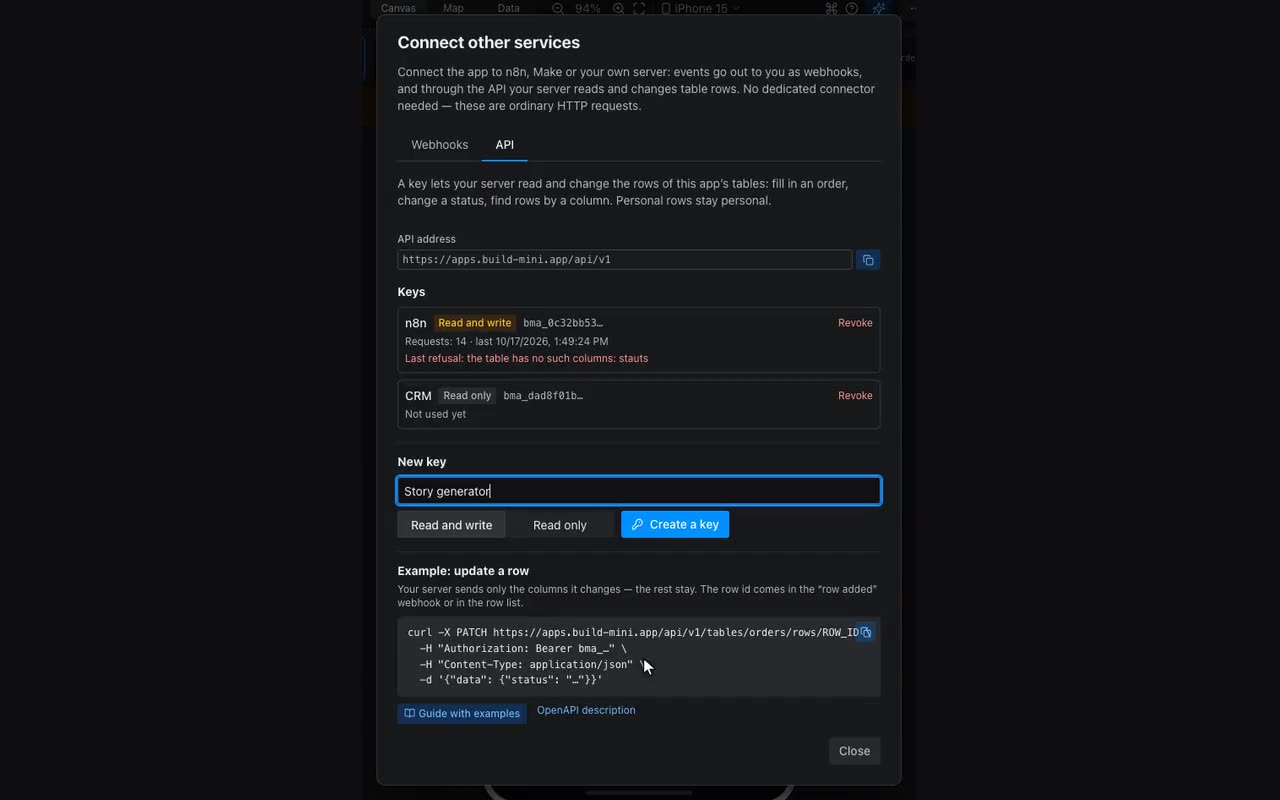
Where: The Data tab → “Connect other services” → the API tab. The app must be published.
A webhook tells your service that something happened in the app. The API answers the opposite question: how your service changes something in the app. Say an order came in, your server generated a story for it and now has to put it into the same order: the text, a link to the file and the status “Done”. The order stays visible only to the person who placed it.
- Open the API tab, name the key (what it is for: “story generator”, “n8n”) and choose the access. A service that updates orders needs “Read and write”; an export to a report is fine with “Read only”.
- Press “Create a key” and copy it right away. The key is shown once: we keep only its fingerprint. Lost it — revoke it and create a new one.
- Check the connection with the first request — it returns the app’s tables with their column keys. You need the column keys in every other request.
curl https://apps.build-mini.app/api/v1/tables \
-H "Authorization: Bearer bma_…"| Request | What it does |
|---|---|
GET /tables | The app’s tables, their columns and write mode. |
GET /tables/{table}/rows | The table’s rows, oldest first. Filter where[column]=value, pages limit and cursor, recent ones updatedSince. |
GET /tables/{table}/rows/{id} | One row. |
POST /tables/{table}/rows | Add a row. In a personal table — saying whose it is. |
PATCH /tables/{table}/rows/{id} | Update a row: the columns you send change, the rest stay. null clears a column. |
DELETE /tables/{table}/rows/{id} | Delete a row. |
Every address starts with https://apps.build-mini.app/api/v1, and the key goes in the Authorization: Bearer <key> header (or X-API-Key: <key> if your service can only do that). The request body is JSON, with the column values inside data.
Example: a story order. A visitor placed an order and the row landed in the personal table requests. Your server learns about it in one of two ways: from the “row added” webhook (it carries data.id, the row id, and data.visitor, who ordered) or by asking for new orders on a schedule.
curl "https://apps.build-mini.app/api/v1/tables/requests/rows?where[status]=Новый" \
  -H "Authorization: Bearer bma_…"
The story is ready, so the server updates the same order. There is no need to send every column, only the ones that change:
curl -X PATCH https://apps.build-mini.app/api/v1/tables/requests/rows/<id> \
  -H "Authorization: Bearer bma_…" \
  -H "Content-Type: application/json" \
  -d '{"data": {"generated_story": "Жил-был…", "result_url": "https://…", "status": "Готово"}}'
The answer is the whole row: id, table, data, visitor (whose row it is; null for app content), createdAt and updatedAt. A buyer with the screen open sees the order update by itself, without reloading.
n8n and Make. An HTTP Request node: method and address from the table above, Header Auth named Authorization with the value Bearer bma_…, JSON body. The API description for import is at https://apps.build-mini.app/api/v1/openapi.json; Postman and Insomnia read it too.
| Refusal code | What it means |
|---|---|
invalid_key | No such key, it was revoked, or the header is wrong. |
read_only_key | The key is read-only and the request writes. |
unknown_columns | The table has no such columns — they are listed in columns. Usually a typo in a column key or a column that is not published yet. |
visitor_required | The table is personal and the row’s owner is missing. |
table_not_found, row_not_found | No such table in the published app, or no such row in this table. |
too_many_requests | More than 300 requests a minute with one key. Wait as many seconds as the Retry-After header says. |
Next to each key the tab shows when it was used, how many requests there were and what the last refusal was. That is the first place to look when a scenario “does nothing”.