Icons: the library and line weight
389 icons in 17 sections, search in Russian and English, line weight per icon and for the whole app.
Where: The Icon block → the Content tab → Icon. The same picker is on icon buttons, the floating button, the header and the bottom menu. Weight for the whole app: More → Project styles → Typography.
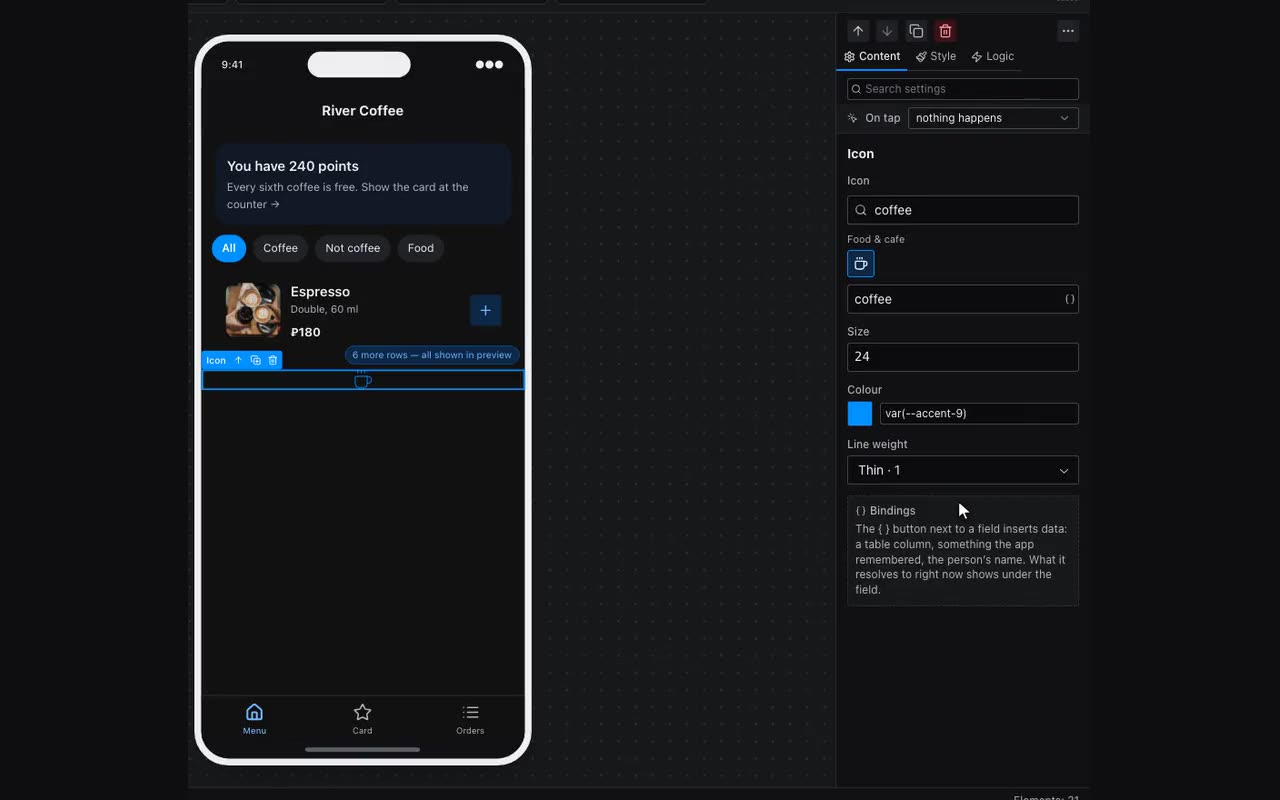
The set has 389 icons in 17 sections: Home and navigation, Shopping and money, Food and café, Sport and health, Beauty and care, Transport and delivery, Time and calendar, Learning and more. No need to scroll — type a word into the search: “coffee”, “booking”, “delivery”. Search works in English and Russian; with several words, all of them must match. Icons you uploaded come first, under “Your icons”.
Line weight on the Icon and the Icon button: Theme default, Thin · 1, Light · 1.5, Regular · 2, Bold · 2.5. A thin line looks refined next to a light font, a bold one confident next to a large one. For every icon in the app at once there is Icon line weight in Project styles → Typography; where a block has its own weight, that one stays. The bottom menu keeps the difference between the selected item and the rest.
Your own icon is not in the set? “Upload your own” under the grid: SVG or PNG, a batch at once. The “Paint with the Color property” switch keeps only the file’s shape and takes the colour from the Color field.