Chat
A one-to-one conversation inside the app: the visitor writes to the author, the author answers, and the bot notifies both.
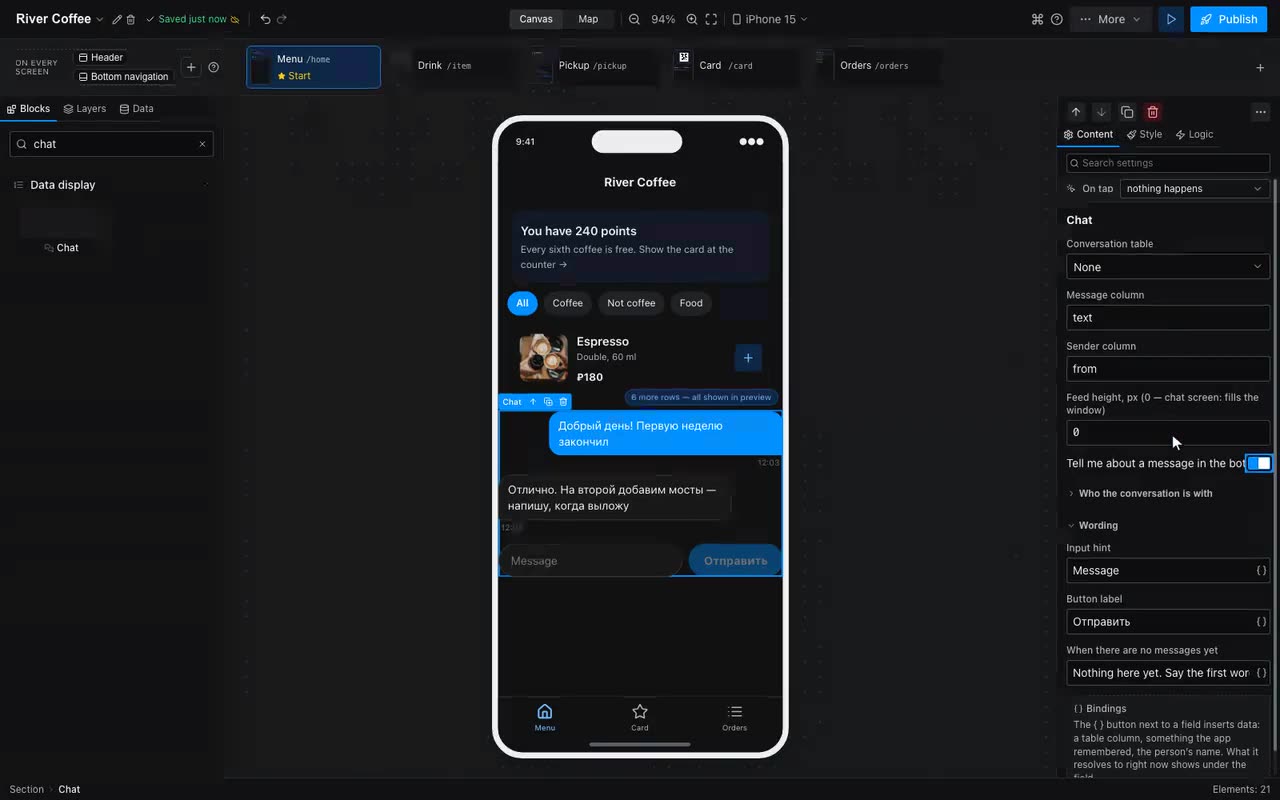
The Chat block is a feed of messages with a composer under it. You could always assemble something similar out of a list, a field and a button; what never came out was the part that makes a conversation read as one: bubbles of different widths on two sides, a feed that keeps itself at the bottom, Enter to send, and a composer that does not slide under the keyboard.
What to fill in:
- Chat table — an ordinary table with the “everyone writes their own, the admin sees all” access mode. A visitor sees their own thread, the author sees every one.
- Text column and “from” column. The block fills the second one itself: both sides live in the visitor’s rows, so what is written is the only way to tell them apart.
- Where the other person is remembered (for the author screen) — on the author’s screen only: the app remembers the person picked from the list here, and the feed shows their thread. A visitor leaves it empty — they have a single thread.
- While nothing is remembered there the author sees a list of conversations: the name, the last line, the time, and a dot on the ones waiting for an answer. A tap opens one; remembering an empty value there with the Remember action returns to the list.
- Feed height. A number keeps a feed of that height in the middle of a page. Zero makes a chat screen: the feed takes whatever is left of the window, scrolls on its own, and the composer stays at the bottom, above the keyboard.
The gestures are the ones people know from messengers. Swipe a message to the right to answer it: the quote sits above the composer, travels with the answer and then shows inside the bubble. Press and hold opens a row of reactions — one tap sets it, the same tap clears it. Both live in the conversation row itself (replyText, replyFrom, reaction), so they are visible in the data panel too.
The Tell the bot about a message tick works both ways and picks the recipient itself: a visitor’s line notifies the app owner, and the author’s answer notifies the visitor it answers. The owner’s bot does the writing, so a notice only reaches someone who has pressed Start in it at least once; silence in that case is not a failure.
Who stands in front of the feed is decided by rights, not by the block: the app’s author and whoever you made an admin of this table see and run other people’s threads; everybody else sees their own. The admin role is set in the table of people where each has a single row: “an admin is the one whose Role column says Coach”.
Where: Block palette → Data Display → Chat.