Record counter
How many table rows match a condition — as a number on screen and in the app memory.
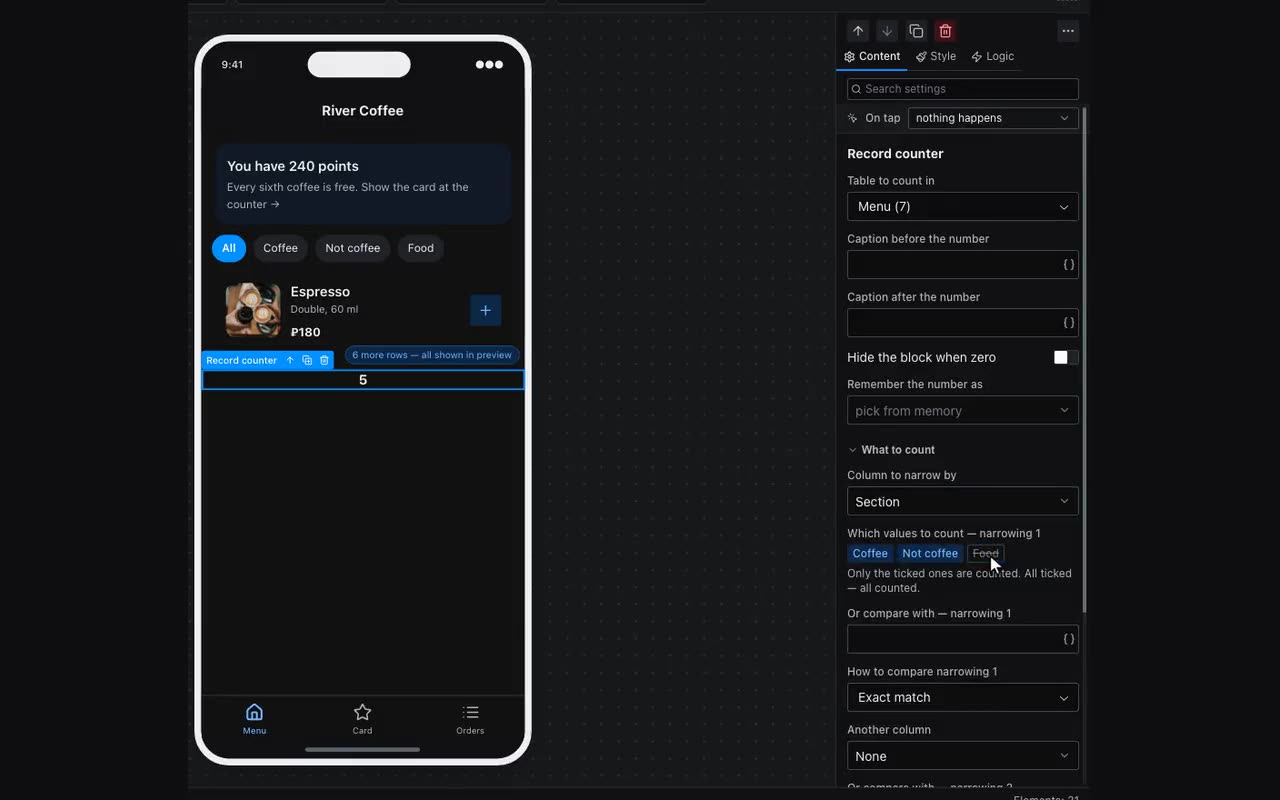
The Record counter block answers “how many”: how many posts await moderation, how many orders this person left, how many messages are unread. It stores nothing and controls nothing — it counts the table rows that match a condition and draws the number.
The {{table.count}} substitution counts the whole table and cannot be narrowed. Narrowing lived only inside the List block — so you could only count what was already drawn as cards. The counter takes the same narrowing and draws nothing but the number.
What to fill in:
- Table to count in — the same one you would give the List block.
- Column to narrow by and which values to count — tick the ones you need: “Awaiting moderation” out of five statuses. All ticked means all counted.
- Or compare with — for columns without a fixed set of values: “author equals
{{user.id}}” gives “how many are mine”. - Fill the first column and a second appears, then a third. The narrowings add up: “awaiting moderation and from this person”.
The block draws a single number and brings no frame or fill of its own. The Look tab does the rest: a red circle over a cart icon is width, height, rounding and a negative outer margin, while a line like “Orders 14” is the captions before and after the number. Turn on “Hide the block when zero” for an unread badge: an empty cart should not wear a circle with a zero in it.
The Remember the number as field makes the counter useful where it is not itself visible: the number is remembered, and substitutions, visibility conditions and tab-bar badges read it from there. An unread counter is placed once — on the chat screen, say — and shown wherever it is asked about.
Where: Block palette → Data Display → Record counter.