A file from a visitor
A CV, a photo of the damage, a lab referral — attached right in the form.
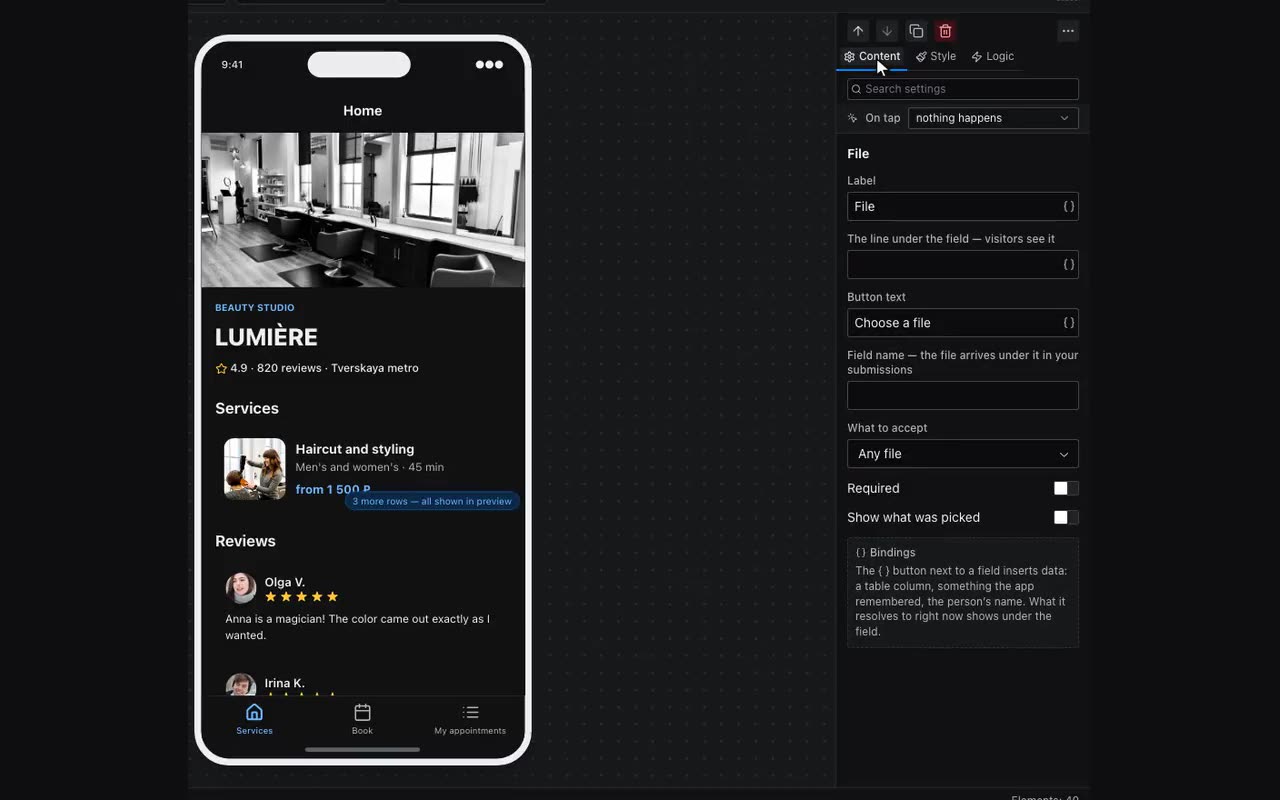
The File block under Input is an ordinary form field: it has a label, a “Field name” and “Required”, like a text input. One difference: the file goes to storage the moment it is chosen, and its address is remembered under the field name.
From then on it behaves like any string: it reaches the owner with the submission as a link that opens the file, and lands in a table column just the same when the button adds a row.
- What to accept — Images, Documents or Any file. It tells the phone which folder to open; it is not the rule — the server checks what is actually accepted.
- Images, PDF, Word and Excel documents, RTF, plain text, CSV and ZIP are accepted, up to 10 MB.
- Show what was picked — a frame appears above the button with whatever the person chose. A picture shows at once, before it even leaves for the server, and whole, uncropped: the frame is there so you can check you attached the right thing. Off by default, so the form stays as it was. Turn it on where people send a poster or a photo: “File attached” does not tell a poster from a stray shot in the gallery, and the owner is the one who finds out.
- A document has nothing to show, so the frame keeps its name: the app does not draw a PDF or a spreadsheet.
- The picker can be opened without a field, too. The Upload a file action goes on any block — a picture, a button, a card: the tap opens the picker, the file goes to storage and its address lands in the variable you named. Put that same variable into the image’s Source field and the picture becomes whatever was picked. That is how a cover or an avatar is changed: tap the picture, choose a new one.
- Put Upload a file on the File field itself, and the field shows what the action uploaded — its cross empties that variable. To remove the picture from another button, use the Clear a variable action with the same variable.
- The editor preview does not upload — there is nowhere to publish to. The picture is shown straight from the browser so you can see the action works; the file reaches the server in a published app.
What has already been sent is in the “More” menu → Files from visitors: name, size, date, an “open” link and a delete button. It also shows how much space is taken.
Leftovers are removed on their own: a file nothing points at any more — no record, no submission, no app — is deleted in about a month. That is how abandoned uploads go: somebody picked a file and never sent the form. While something points at it, a file lives as long as you like.