Rows written by visitors
Cart, favourites, order history, reviews — the things that survive closing the app.
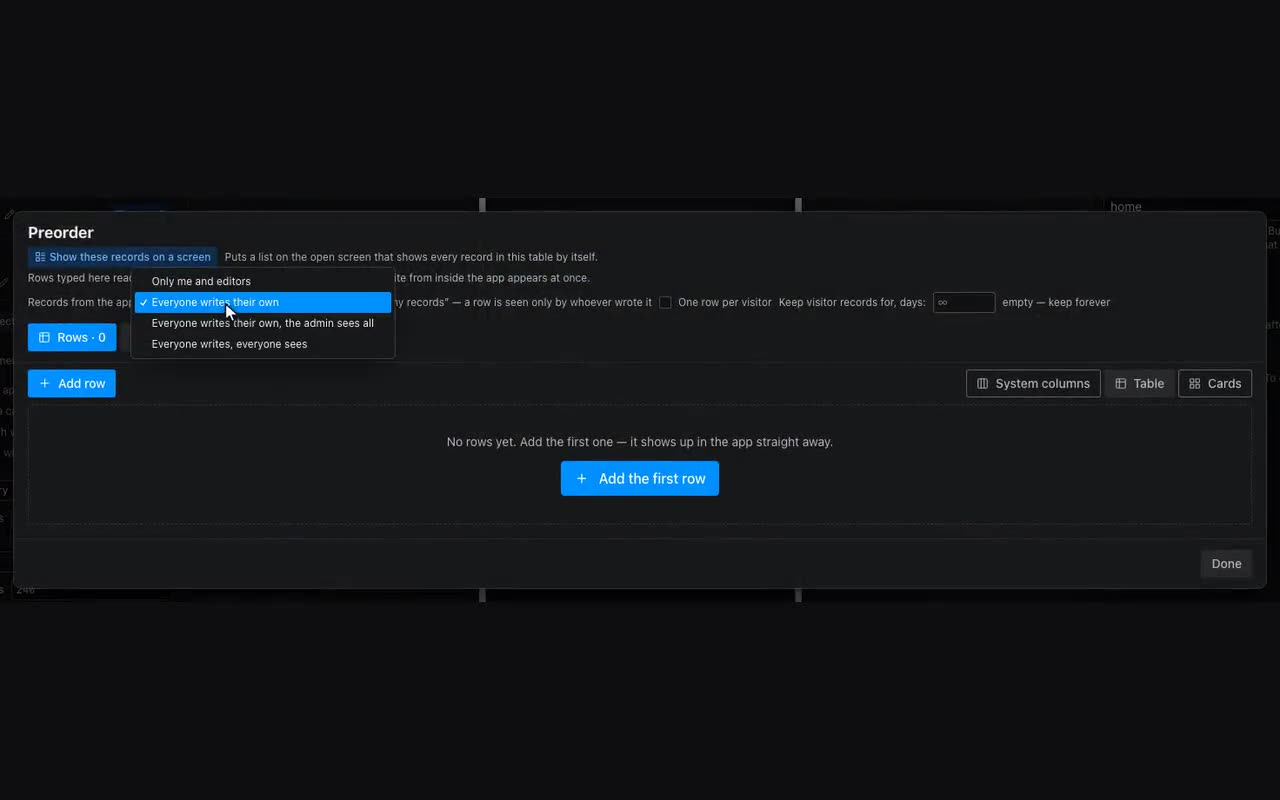
A normal table holds your data: you write, everyone reads. A cart is the opposite — everyone has their own. That is why a table has a Records from the app setting, right next to its name in the table window.
- Only me and editors — as before. This is how every table starts.
- Everyone writes their own — cart, favourites, “my records”, order history. A row is seen only by whoever wrote it.
- Everyone writes their own, the admin sees all — the same, but one person sees every row of that table. That is how requests are collected when somebody other than the owner handles them: the admin only needs the app, not the account.
- Everyone writes, everyone sees — reviews, listings, a board. What a visitor writes is seen by everyone who opens the app.
Who the admin is is asked right under the choice: “The admin is whoever has [field] equal to [value]”. The field comes from the people table (“one row per visitor”), usually “Role”, and the value is “Admin”. After that you just set the role on that person in the table, from the editor. Until the field and the value are chosen the rule is incomplete: nobody is an admin and the table stays private — showing other people’s rows on a half-set rule is not something to do.
Everything else is as usual: an “Add to cart” button is the Add row action, and the cart is shown by an ordinary repeater over the same table. No special blocks needed.
In the table these rows are visible to you and labelled Visitor — they are your data and you can edit them here. A visitor only changes or removes what they wrote themselves; inside the app their own row is told apart with the {{item.__mine}} condition.
Next to “Everyone writes, everyone sees” there is a Show after review checkbox. With it a review arrives hidden: you and its author see it, everyone else only after you press the eye on the row. Such a row is labelled Awaiting review.
The same eye hides a review that is already visible — for when you learn about it from a complaint. It is not a deletion: the text stays in the table, and the same icon brings the row back if the complaint turns out to be empty. Inside the app the author tells their waiting row apart with the {{item.__pending}} condition, which is how “awaiting review” is drawn next to it.
Personal records are counted separately from your catalogue. A plan names two numbers: records are your goods, events and services, while customers’ carts and favourites have their own allowance. So a shop that comes alive no longer takes away your room for goods: a dozen customers with full carts used to be able to eat the whole quota, leaving nowhere to add an event.
Next to “Everyone writes their own” there is a Keep visitor records for, days field. Empty means forever, and that is how every table starts. Put a number in and rows older than that are removed automatically, once a day. This is about abandoned carts: an order assembled and forgotten a year ago takes up your space and is of use to nobody. Favourites are usually left without a limit, carts get weeks, order history gets however long you need to see it.
A users table: who has opened the app. Both write modes have a One row per visitor checkbox: a repeat write edits that person’s row instead of adding another, and fields merge — a phone saved on one screen is not wiped by a name from another. There is a ready-made preset in “+ Table” → “Users”: phone, name, Telegram ID, MAX ID and Role (one of a list), already set to “everyone writes their own” — otherwise every visitor would see everyone’s phone number — and with “Fill this table automatically” ticked.
That checkbox is what keeps the register: a person’s row appears by itself when they open the app, carrying their name and their platform id (columns name, tgId, maxId). Rename a column key and it stops being filled — the data panel says so right under the checkbox. The phone number is deliberately not recorded this way: people share it with a separate tap, and taking it silently would go around the “Share number” button. Any table with “one row per visitor” has the checkbox, not just the preset; tables built earlier have it off — turn it on if you want the same register.
The phone still comes from an action: “Ask for phone” has a “Save the number to a table” field — pick your visitors table there and the row appears as soon as the person shares the number (the column defaults to phone; name your own if you like). Want the name and the ids too — add “Add row” after it with {{user.tgId}}, {{user.maxId}} and {{user.name}}: no form needed there, the values go in “What to write”. The platform ids come one at a time: the one you opened from is filled, the other is empty, and an empty value never wipes the other column — come in from Telegram first and from MAX later, and the row collects both. ({{user.id}} means “the id on whatever platform this is”, so it does not belong in a “Telegram ID” column.) You read that person’s row back with {{me.…}}: {{me.phone}}, {{me.role}} — they are in the data picker under “This visitor”. Roles follow from that: set someone to “admin” right in the table and give a block the condition “show when {{me.role}} equals admin”. Until a person leaves anything about themselves, {{me.…}} is empty and the condition does not match.