Workout timer
Intervals with rounds, and a stopwatch: the block runs the session itself and remembers the result.
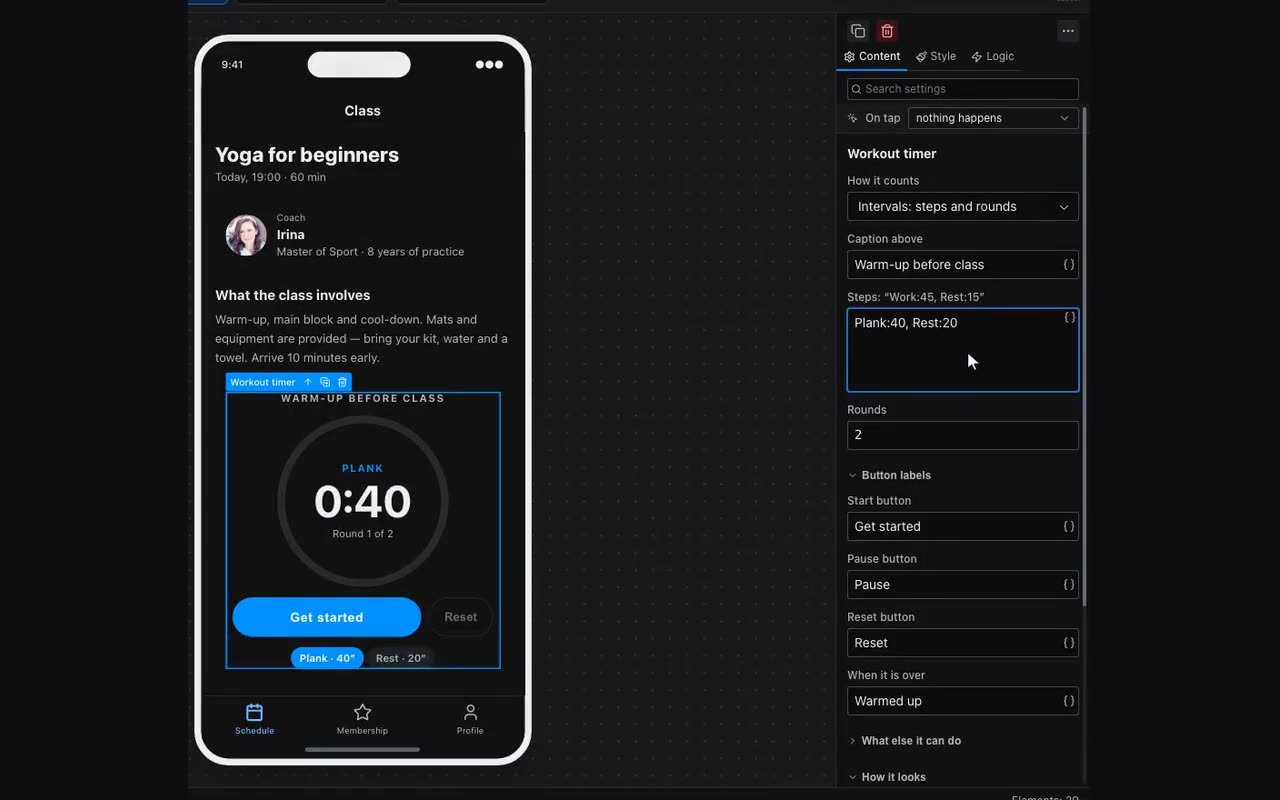
The Workout timer block is for anything done by the clock: a warm-up, a circuit, a plank, stretching, breathing — and brewing coffee or developing a dye, for that matter. Without it the routine has to be written out in words — “forty-five seconds of work, fifteen of rest, eight rounds” — and the person leaves for the phone’s own stopwatch, which means leaving your app.
Where: Block palette → the Data display group → Workout timer. Its settings live in the Content tab on the right.
The whole routine is written on one line: “what — how long” pairs, separated by commas or line breaks. There is no need for a table — there are five to eight steps, they change along with the lesson text, and it is easier to edit them right where the block stands.
Разминка:60, Работа:45, Отдых:15A duration is understood three ways, and you do not have to choose between them — write it the way you would say it:
| What you type | What it means |
|---|---|
Work:45 | 45 seconds |
Plank:1:30 | a minute and a half |
Run:2 min | two minutes |
Beside that line sits Rounds — how many times to repeat the whole set. Eight rounds of “Work:45, Rest:15” is a classic Tabata, and it takes two fields rather than sixteen steps. Under the ring the block draws the step list itself: past steps dim, the current one is highlighted, so you can see where you are without reading the numbers.
Controls are two buttons, not three. Start and Pause are one button in two states — you hit it back and forth without looking. Reset sits beside it and stays dim while there is nothing to reset. All three captions are yours to write: an app speaks its author’s language, and “Let’s go” instead of “Start” is typed straight into the field.
The phone buzzes briefly when the step changes and longer at the end: at that moment the person is looking at the floor or the ceiling, and “work → rest” has to reach them without eyes. The Buzz when the step changes checkbox turns it off.
The second mode is a stopwatch: it counts up, with no steps and no rounds. Use it for what cannot be planned in advance — how long someone hung from the bar, how fast they ran the lap, how long they held the pose. In this mode the second button does not reset: it stops and records the result, so give it a caption of its own — “Record” or “Done”.
Where the result goes is decided by Remember the result as. Type a name there and the seconds are remembered under it — from then on it is an ordinary value: shown with a {{ }} binding, compared by a condition, saved into a table of measurements by a button next to it.
- Add a name to memory: Data → App memory, say
holdSeconds. - Type that name into the timer’s Remember the result as field.
- Put a button beside it with the Add row action into your measurements table, binding
{{holdSeconds}}to the right column.
The ring’s size and colour are set in the same place — Ring size and Ring colour. The colour is an ordinary block colour with its own light/dark pair, so the ring need not be the same in a dark theme.